
13 January 2026
Free for Frequent Flyers
From 13 January 2026, the Pop-up Store will be free for all Frequent Flyers at Print.com. This has been introduced as an additional benefit for our loyal customers.
1 April 2025
Engagement Bubbles
To increase the conversion rate of your Pop-up Store, we have added engagement bubbles. These bubbles appear when a visitor lands on your website for the first time. You can add an avatar, title, and header to the text bubble.
Call-to-action buttons are also available, allowing visitors to get in touch more quickly or view products faster.
Here is an example of Engagement Bubbles:

21 March 2025
Catalogue Mode
It is now possible to use the Pop-up Store without displaying prices. This feature is called Catalogue Mode. Visitors can select quantities and choose regular product options, but they will not see any pricing information.
Price information remains visible in the request you receive. This gives you a direct indication of potential costs while maintaining the ability to open the requested product directly in the Print.com web app.
Activate Catalogue Mode in your account settings.
Share Product Link
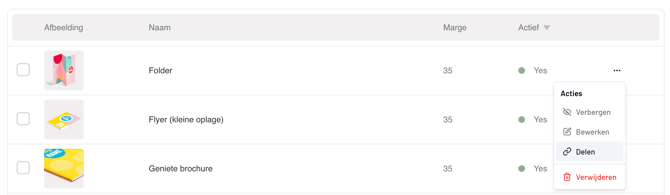
A new feature has been added to the product overview that allows you to easily share a product link. When this link is used, the recipient is directed to your website, the Pop-up Store opens automatically, and the shared product is displayed immediately.
This is very useful for quickly showing customers the possibilities for specific products.
Go to Products in the left-hand menu and click the action button next to a product in your overview. Click Share to copy the product link to your clipboard.
Please note: Sharing products is only possible after you have added the domain under Installation where the Pop-up Store is installed. The product must also be visible in your Pop-up Store.
WhatsApp Integration
To make it easier and faster to connect with visitors and customers, we have developed a WhatsApp integration. This allows visitors to continue the conversation in WhatsApp when requesting a quote or asking a direct question. This is especially useful if you use WhatsApp to communicate with customers.
If a visitor submits a request via WhatsApp, you will still receive it in your requests overview. You can open it immediately and continue the conversation live in WhatsApp. You also retain the option to open the product directly in the Print.com web app.
We have considered several scenarios:
Visitor using a desktop without WhatsApp installed:
The Pop-up Store detects when someone is using a desktop and will ask for a mobile phone number. After confirmation, we send a free SMS to the lead containing a link and brief instructions. When the link is activated, WhatsApp opens on their mobile device with a pre-filled message. The lead only needs to press send to start the conversation. This ensures the visitor initiates the conversation, so the service cannot be considered spam.
Visitor using a mobile device with WhatsApp installed:
The Pop-up Store detects the mobile device and asks for a name and phone number. The phone number is requested in case the conversation is not started, allowing you to follow up yourself. After confirmation, WhatsApp opens with a pre-filled message ready to send.
Activate WhatsApp in your account settings and add the number where you are available as a reseller.

5 March 2025
Discover the Pop-up Store dashboard, packed with valuable insights and trending products. Use the dashboard to better understand how your website and Pop-up Store are being used. See what your visitors are viewing and easily add new trending products based on the latest Print.com marketing campaigns.
Get to know the Pop-up Store dashboard.