---
title: Save your shopping cart
description: Easily manage multiple projects by saving your shopping carts. Name your cart for reference, share it with colleagues, and pick up right where you left off—even after logging out.
---
[Skip to content](https://knowledge.print.com/helpcenter/save-your-shopping-cart#main-content)
- [English](https://knowledge.print.com/helpcenter/save-your-shopping-cart)
- [Nederlands](https://knowledge.print.com/nl/helpcenter/nl/save-your-shopping-cart)
English
Show submenu for translations
[More support](https://knowledge.print.com/helpcenter/kb-tickets/new?hsLang=en)
[](https://knowledge.print.com/migration/nl/helpcenter?hsLang=en)
-
Open main navigation
Close main navigation
-
- - [English](https://knowledge.print.com/helpcenter/save-your-shopping-cart)
- [Nederlands](https://knowledge.print.com/nl/helpcenter/nl/save-your-shopping-cart)
English
Show submenu for translations
- [More support](https://knowledge.print.com/helpcenter/kb-tickets/new)
- [Back to the webapp](https://app.print.com/)
[Back to the webapp](https://app.print.com/)
How can we help you?
- There are no suggestions because the search field is empty.
1. [Print.com Help Center](https://knowledge.print.com/helpcenter?hsLang=en)
2. [Ordering](https://knowledge.print.com/helpcenter/ordering?hsLang=en)
# Save your shopping cart
## Easily manage multiple projects by saving your shopping carts. Name your cart for reference, share it with colleagues, and pick up right where you left off—even after logging out.
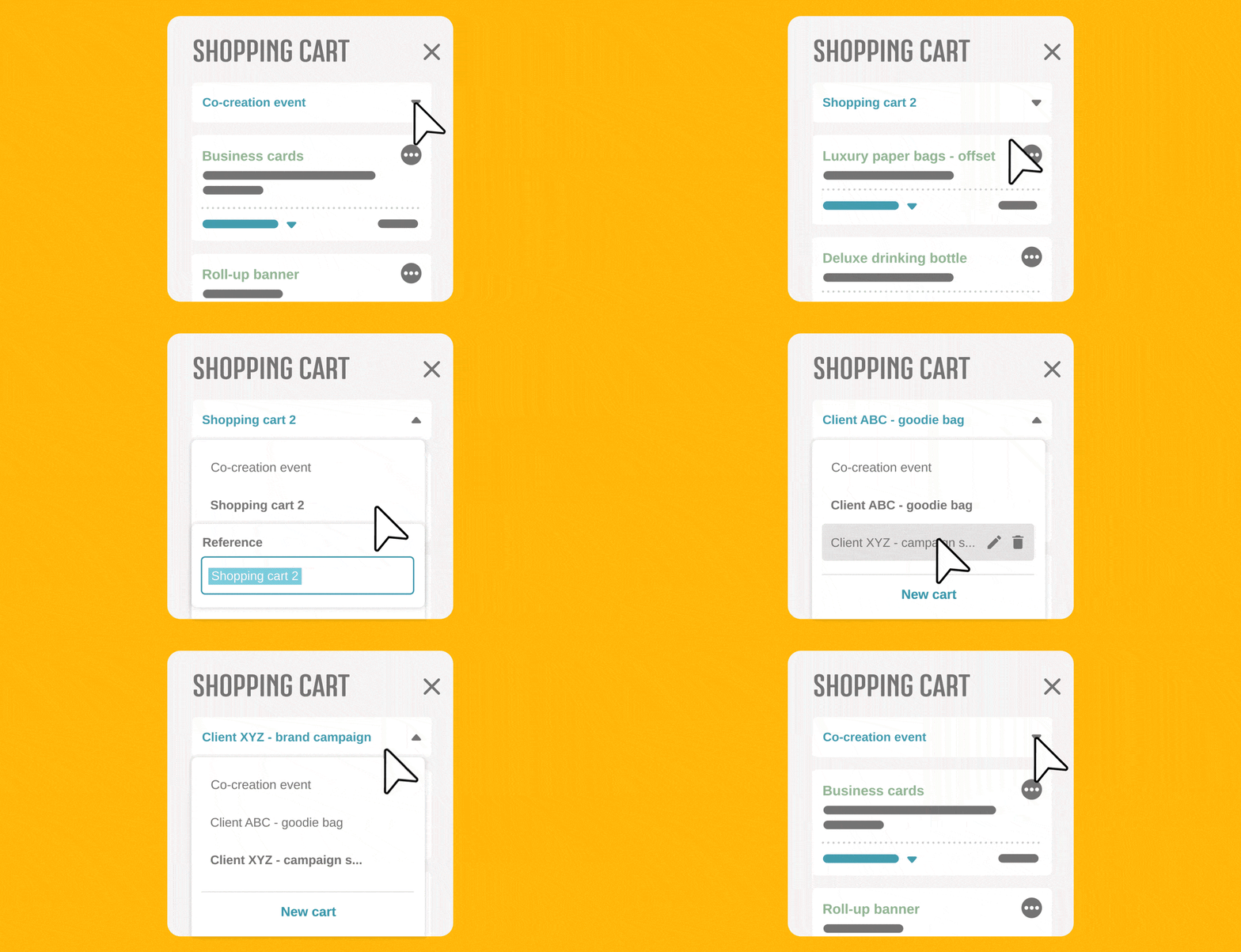
Save your shopping cart when you're working on multiple projects at the same time or sharing your account with a colleague. You can save as many shopping carts as you like, and when you place an order, the cart disappears automatically. We use the name of your shopping cart as a reference. Logging out? No problem. We’ll remember your cart for next time.
### **Good to know**
Save as many shopping carts as you like. When you place an order, the cart disappears automatically. The name of your shopping cart is used as a reference. Your cart stays saved even when you log out
### **Try it yourself**
Watch the animation below or [start the tour](http://app.print.com/?userflow=f96f4e6c-dbcf-4b26-bbfe-a1c76529556a) to try it yourself!
- [Getting started](https://knowledge.print.com/helpcenter/getting-started?hsLang=en)
- [Products](https://knowledge.print.com/helpcenter/products?hsLang=en)
- [Ordering](https://knowledge.print.com/helpcenter/ordering?hsLang=en)
- [Payment](https://knowledge.print.com/helpcenter/payment?hsLang=en)
- [Upload files](https://knowledge.print.com/helpcenter/upload-files?hsLang=en)
- [Shipping & Delivery](https://knowledge.print.com/helpcenter/shipping-delivery?hsLang=en)
- [Sustainability](https://knowledge.print.com/helpcenter/sustainability?hsLang=en)
- [Solutions](https://knowledge.print.com/helpcenter/solutions?hsLang=en#main-content)
- [Pop-up Store](https://knowledge.print.com/helpcenter/solutions?hsLang=en#pop-up-store)
- [Print on Demand plugin, WooCommerce](https://knowledge.print.com/helpcenter/solutions?hsLang=en#print-on-demand-plugin-woocommerce)
- [Print on Demand, Shopify app](https://knowledge.print.com/helpcenter/solutions?hsLang=en#print-on-demand-shopify-app)
[](http://print.com?hsLang=en)
Copyright © 2025, Print.com