---
title: Campaigns
description: This article explains what campaigns are in the Pop-up Store and how to use them.
---
[Skip to content](https://knowledge.print.com/helpcenter/en/campaigns#main-content)
- [English](https://knowledge.print.com/helpcenter/en/campaigns)
- [Deutsch](https://knowledge.print.com/de/helpcenter/campaigns)
- [Français - France](https://knowledge.print.com/fr-fr/helpcenter/campaigns)
- [Nederlands](https://knowledge.print.com/nl/helpcenter/nl/campagnes-)
- [Nederlands - België](https://knowledge.print.com/helpcenter-nl-be/campaigns)
English
Show submenu for translations
[More support](https://knowledge.print.com/helpcenter/kb-tickets/new?hsLang=en)
[](https://knowledge.print.com/migration/nl/helpcenter?hsLang=en)
-
Open main navigation
Close main navigation
-
- - [English](https://knowledge.print.com/helpcenter/en/campaigns)
- [Deutsch](https://knowledge.print.com/de/helpcenter/campaigns)
- [Français - France](https://knowledge.print.com/fr-fr/helpcenter/campaigns)
- [Nederlands](https://knowledge.print.com/nl/helpcenter/nl/campagnes-)
- [Nederlands - België](https://knowledge.print.com/helpcenter-nl-be/campaigns)
English
Show submenu for translations
- [More support](https://knowledge.print.com/helpcenter/kb-tickets/new)
- [Back to the webapp](https://app.print.com/)
[Back to the webapp](https://app.print.com/)
How can we help you?
- There are no suggestions because the search field is empty.
1. [Print.com Help Center](https://knowledge.print.com/helpcenter?hsLang=en)
2. [Solutions](https://knowledge.print.com/helpcenter/solutions?hsLang=en)
3. [Pop-up Store](https://knowledge.print.com/helpcenter/solutions?hsLang=en#pop-up-store)
# Campaigns
## This article explains what campaigns are in the Pop-up Store and how to use them.
**What is a campaign?**
A campaign is a temporary promotion within the Pop-up Store that allows you to:
- Select specific products
- Activate visible promotional elements such as a top bar, banner, engagement bubble, or pop-up
- Decide when the campaign starts and ends
- Campaigns help you draw focused attention to specific products.
**What types of campaigns are available?**
When starting a campaign, you can choose between two options:
- *Import template*: Use an existing campaign as a base. This is useful if you want to launch quickly or reuse a seasonal campaign.
- *Empty campaign*: Start a campaign from scratch and configure everything yourself.
**Which promotional elements are available?**
Within a campaign, you can use different promotional elements. These determine how and where your campaign is displayed to website visitors.
**Widget banner**
An image with a title that appears when opening the campaign inside the Pop-up Store.
**Campaign banner**
An image with a title shown on the homepage of your Pop-up Store.
**Attention bar**
A narrow bar displayed at the top of the website that remains visible at all times.

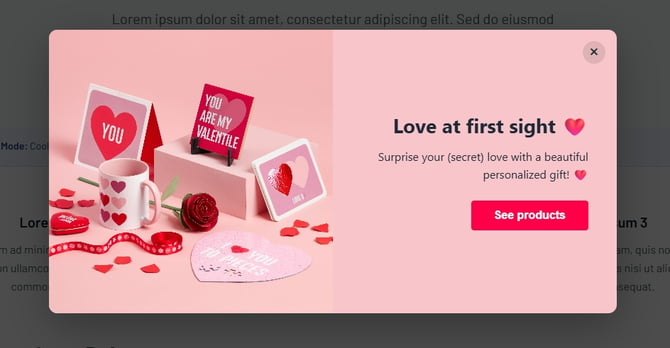
**Pop-up modal**
A banner that appears on the page when visiting the website and visually communicates your message.
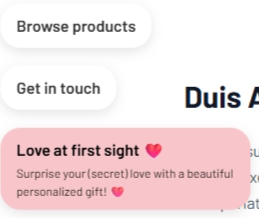
**Engagement bubble**
Appears during a visitor’s first website visit and can include call-to-action buttons for contact or product display.
Important to know
- Campaigns do not affect your default Pop-up Store settings
- You decide which products are visible for each campaign
- Multiple campaigns can run alongside each other
- [Getting started](https://knowledge.print.com/helpcenter/getting-started?hsLang=en)
- [Products](https://knowledge.print.com/helpcenter/products?hsLang=en)
- [Ordering](https://knowledge.print.com/helpcenter/ordering?hsLang=en)
- [Payment](https://knowledge.print.com/helpcenter/payment?hsLang=en)
- [Upload files](https://knowledge.print.com/helpcenter/upload-files?hsLang=en)
- [Shipping & Delivery](https://knowledge.print.com/helpcenter/shipping-delivery?hsLang=en)
- [Sustainability](https://knowledge.print.com/helpcenter/sustainability?hsLang=en)
- [Solutions](https://knowledge.print.com/helpcenter/solutions?hsLang=en#main-content)
- [Pop-up Store](https://knowledge.print.com/helpcenter/solutions?hsLang=en#pop-up-store)
- [Print on Demand plugin, WooCommerce](https://knowledge.print.com/helpcenter/solutions?hsLang=en#print-on-demand-plugin-woocommerce)
- [Print on Demand, Shopify app](https://knowledge.print.com/helpcenter/solutions?hsLang=en#print-on-demand-shopify-app)
[](http://print.com?hsLang=en)
Copyright © 2025, Print.com